Google Gemini 2.5 !
ভাবুন আপনি, একটা AI-কে বললে “Open Google Chrome, search ‘best web dev course in bd’, scroll kore first link e click koro.”
আর সেটা,আপনি না, AI নিজে screen-এ click kore, scroll kore, type kore – সব কিছু complete kore ফেলল!
📌 Key Takeaways
- Gemini AI can interact directly with computer interfaces – click, type, scroll.
- It bridges the gap between AI conversation and real-world actions.
- Safety is a priority – risky actions need confirmation; misuse is prevented.
- Use cases include software testing, workflow automation, personal digital assistants, and accessibility tools.
- Gemini 2.5 outperforms previous UI-interaction models in accuracy, speed, and multi-modal understanding.
- The future is hands-on AI can now do tasks independently, not just suggest them.
এটাই হচ্ছে Google DeepMind’s Gemini Computer Use Model – এমন এক update যেটা পুরো AI-র world-টাকেই বদলে দিতে পারে।
আগে যেখানে ChatGPT বা Gemini কেবল text generate করতে পারত, এখন তারা computer interface-এ interact করতে পারবে মানে AI এখন virtual mouse আর keyboard চালাতে শিখে ফেলেছে!
What is Gemini Computer Use Model?
এই model-টা হচ্ছে Google DeepMind-এর নতুন Gemini 2.5 system-এর একটা special version ।
যার কাজ হচ্ছে AI-কে computer-এর সাথে interact করা শেখানো।
সোজা কথায়, এটা এমন একটা system যেটা:
- আপনার instruction বুঝবে,
- screen-এর UI (user interface) চিনবে,
- এবং ঠিক যেভাবে একজন মানুষ কাজ করে, সেভাবে click, type, scroll করবে!
আগে AI-রা শুধু structured data নিয়ে কাজ করত (মানে API call, command line etc.) ।
কিন্তু এখন এই model screen-এর elements, যেমন button, textbox, dropdown, scrollbar – চিনে নিয়ে তাতে action নিতে পারছে।
এক কথায়, AI-র হাতে এখন একটা virtual mouse + keyboard!
How Does It Work? Step by Step
পুরো system-টার কাজ করার ধাপগুলো শুনে মনে হবে একটু sci-fi movie চলছে! চলুন, step-by-step দেখিঃ
- Input Stage:
User একটা instruction দেয় – যেমন, “Fill up this form and submit it.”
সাথে দেয় screen-এর screenshot + past action history. - Model Processing:
Gemini model image-টা in-details এ দেখে, কোন button কোথায় আছে, textbox-এ কি লেখা দরকার, কোন জায়গায় click করতে হবে ইত্যাদি। - Output Stage:
Model তার output দেয় action-এর form-এ – যেমন, “Click on submit button” বা “Type user name in the first field.” - Action Execution:
System সেই action real-life-এ perform করে, মানে screen-এ click করে দেয় বা type করে ফেলে। - Feedback Loop:
Updated screenshot আবার model-এর কাছে ফেরত যায় যাতে সে বুঝতে পারে, কাজটা সফলভাবে হয়েছে কিনা। না হলে, সে আবার next action দেয়।
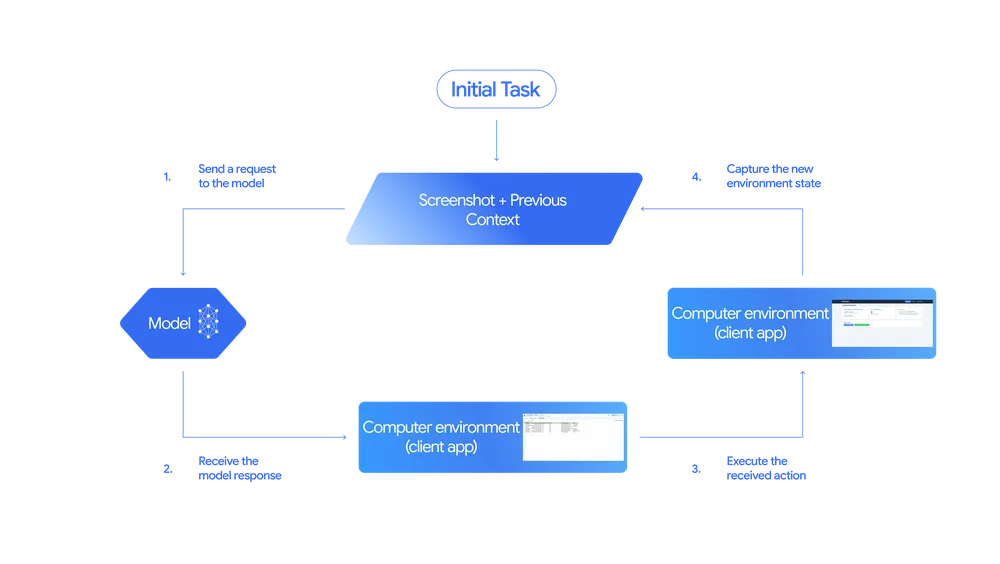
এভাবে loop চলতে থাকে যতক্ষণ পর্যন্ত task complete না হয়।
Safety First – কারণ AI এখন হাতে “mouse” পেয়েছে
Google DeepMind বুঝেছে যখন AI কে system-এর control দেওয়া হচ্ছে, তখন safety issue অনেক বড় ব্যাপার।
তাই তারা কিছু solid safety layer দিয়েছে:
- AI sensitive action নিতে পারবে না (যেমন delete files, change settings ইত্যাদি) developer-এর permission ছাড়া।
- Risky action-এর আগে confirmation নিতে হবে।
- Logs automatically track হবে যাতে misuse detect করা যায়।
মানে, Google বলছে – “AI কে ফ্রিডম দিচ্ছি, কিন্তু সীমা রেখেও রাখছি!”
AI Powered
Complete Web Development Bootcamp Batch 14
Real-Life Use Cases – কোথায় কাজে লাগবে এই technology
এই Gemini Computer Use Model আমাদের real world-এ কীভাবে use হতে পারে:
- Software Testing Automation:
এখন QA testers-দের অনেক repetitive কাজ AI করে দিতে পারবে। একটা form-এ click-scroll-submit test manually না করে AI automatically করে ফেলবে! - Personal Digital Assistant:
Feature এ আপনি Gemini-কে বলবেন – “Download my assignment file and send it to my teacher.” আর AI সেটাই করবে – কোনো manual কাজ ছাড়াই। - Workflow Automation:
Company-র repetitive কাজগুলো যেমন data entry, report generation – AI interface-এর মাধ্যমেই করে ফেলতে পারবেন। - Accessibility Enhancement:
যাদের physical disability আছে, তারাও AI-এর voice instruction দিয়ে পুরো computer চালাতে পারবে।
Gemini 2.5 vs Others – কতটা এগিয়ে?
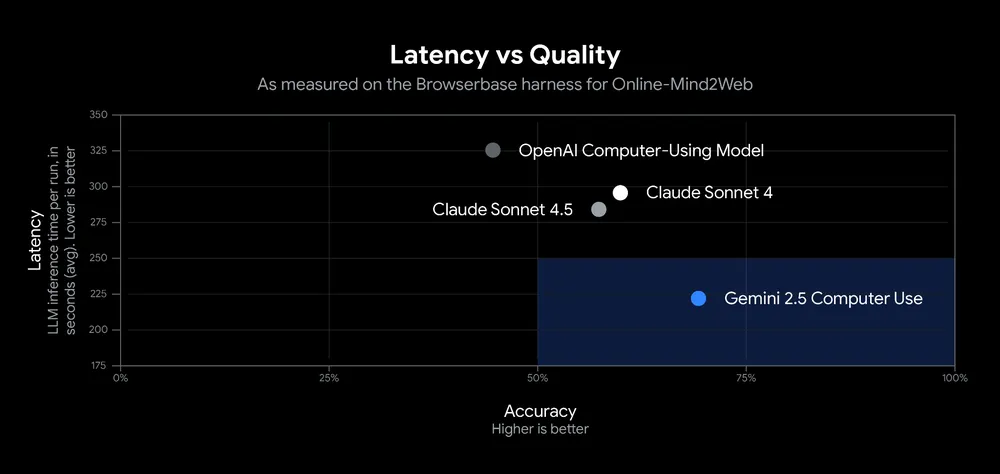
Google বলছে, এই model-টা অনেক benchmark-এ অন্য সব UI-interaction model থেকে better perform করেছে।
Latency কম, accuracy বেশি – এবং multi-modal understanding-এ অসাধারণ।
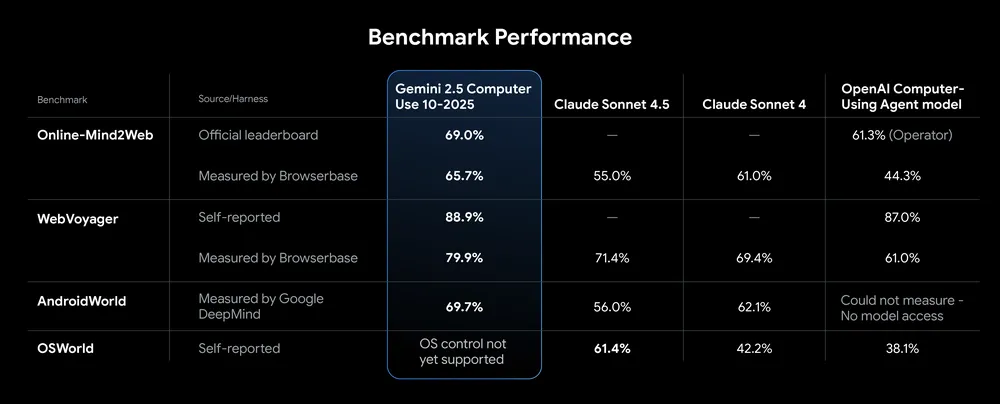
মানে, text, image, UI element সব কিছু একসাথে বুঝে কাজ করতে পারে।
এই efficiency-টাই Gemini-কে আলাদা করছে ChatGPT, Claude, বা অন্য model-দের থেকে।
Why it Matters ?
এই update-এর মানে হলোঃ AI এখন আর কেবল information generator নয়, বরং task performer হয়ে উঠছে।
ভাবেন আপনার AI assistant এখন Google Sheet খুলে data analyze করতে পারবে, form fill-up করতে পারবে, বা e-mail পাঠাতে পারবে – সব কিছু screen-এ নিজে নিজে click করে।
এটা মানে AI-র আরেকটা নতুন যুগ শুরু “From conversation to real-world action.”
Future Potential – এরপর কোথায় যেতে পারে AI
এই model-টা এখন preview stage-এ আছে, developers-রা use করতে পারবে Gemini API, Vertex AI, বা Google AI Studio দিয়ে।
কিন্তু ফিউচার এ এটা যদি full public-release পায়, তাহলেঃ
- Freelancers-রা simple repetitive কাজ AI দিয়ে automate করতে পারবে
- Developers-রা website UI-test সহজে করতে পারবে
- AI personal agent বিল্ড করা যাবে, যেটা আপনার হয়ে কাজ করবে
মানে future-এ আপনার পাশে একটা “digital worker” থাকবে – যা ২৪ ঘণ্টা non-stop কাজ করতে পারবে ।
Conclusion – AI Can Now Act, Not Just Think
Google DeepMind’s Gemini Computer Use Model shows us a bold new step in AI evolution. This isn’t just about generating text anymore – it’s about real actions. AI can now see a screen, understand it, click buttons, type text, scroll pages, and complete tasks just like a human would.
This model bridges the gap between conversation and action, making automation smarter, faster, and safer. Gemini AI opens up a world where digital assistants don’t just advise – they do.